
Overview: Programming a LiftMaster Garage Door Remote
How Do I Program a LiftMaster Garage Door Remote? If you recently bought a new remote or replaced your garage door opener, you may be wondering how to program a LiftMaster garage door remote. Fortunately, the process is quick and usually takes less than a minute. Most LiftMaster garage door openers use a built-in “Learn” button on the motor unit that allows you to connect new remotes easily.
The Learn button method is the standard programming process used on most LiftMaster models manufactured in the last two decades. When activated, the opener temporarily enters learning mode, allowing it to recognize the signal from your remote control. Once paired, the remote will operate the garage door just like the original one.
Programming is typically required when:
-
You buy a new remote control
-
You replace a garage door opener
-
You reset the opener memory
-
You add an additional remote for another family member
Before starting, make sure your remote has working batteries and that you can access the motor unit mounted on the garage ceiling.
Locate the LiftMaster “Learn” Button
Where the Learn Button Is Found
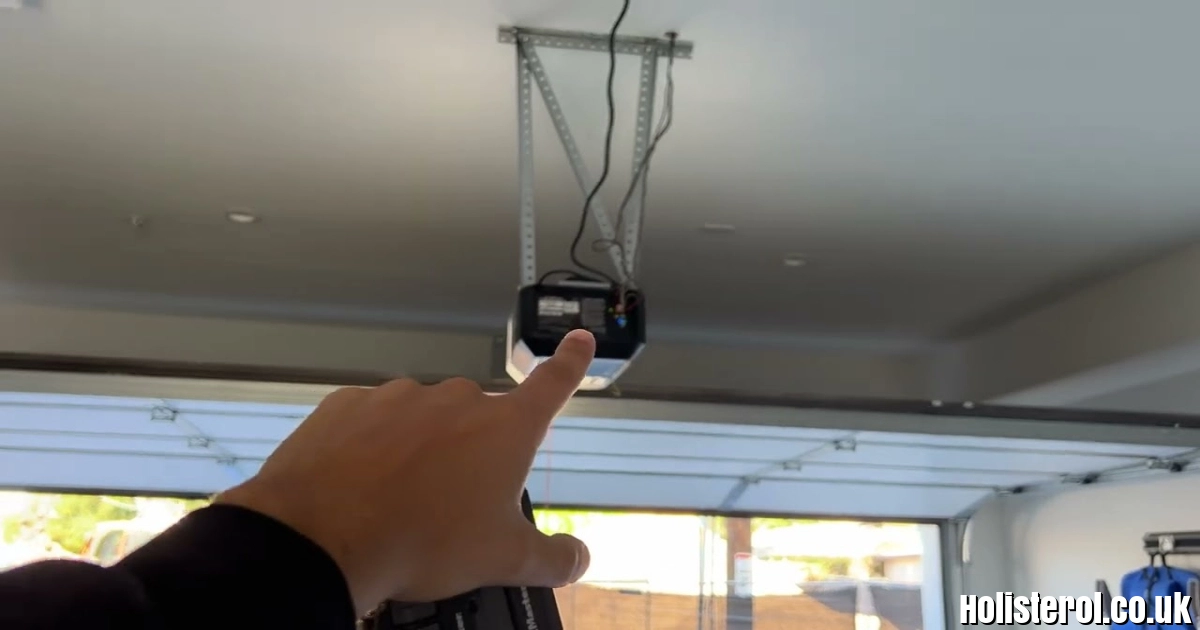
The most important step in programming your remote is finding the Learn button on the garage door opener motor unit. This button is typically located:
-
On the back or side of the motor unit
-
Under the light cover panel
-
Near the hanging antenna wire
Depending on the model, the Learn button may be different colors, including:
-
Yellow
-
Purple
-
Red
-
Orange
-
Green
Each color indicates a slightly different radio frequency system, but the programming steps remain mostly the same.
Why the Learn Button Is Important
When you press the Learn button, the opener activates a 30-second programming window. During this time, it can recognize and store the signal from your remote control. Once the signal is received, the opener saves the remote in its memory.
If the remote is not programmed within the time window, you simply need to press the Learn button again and repeat the process.
Step-by-Step: How to Program a LiftMaster Remote
Basic Programming Instructions
Follow these simple steps to program your LiftMaster remote:
-
Locate the Learn button on the garage door opener motor unit.
-
Press and release the Learn button once.
-
The LED light will turn on, indicating the opener is in learning mode.
-
Within 30 seconds, press and hold the button on your remote.
-
Continue holding until the garage door opener lights flash or you hear two clicks.
-
Release the remote button.
Your remote is now successfully programmed.
Test the Remote
After programming, press the remote button again to confirm that the garage door opens and closes correctly. If the door does not respond, repeat the programming steps.
Programming Special LiftMaster Remote Models
MAX Series Remotes (893MAX / 890MAX)
Some universal LiftMaster remotes require a slightly different first step.
-
Press and hold the Program button on the remote until the LED light turns on.
-
Release the button.
-
Press the Learn button on the opener.
-
Press the remote button you want to use.
Once the opener lights flash, the remote is paired.
Wall Control Panels and Smart Panels
Certain LiftMaster wall-mounted control panels require pressing the Learn button twice to activate programming mode. This feature is common in newer security+ 2.0 systems.
If your opener includes a digital display or smart wall panel, check the settings menu for remote programming options.
Programming Remotes Using the myQ App
For Wi-Fi Enabled LiftMaster Openers
Many modern LiftMaster models support smart home integration through the myQ app. If your opener has Wi-Fi capability, you can program accessories directly from your smartphone.
Steps for adding a remote using myQ:
-
Open the myQ app on your phone.
-
Select Add Device.
-
Tap Accessory.
-
Choose Remote Control.
-
Follow the instructions to pair the remote.
This method is particularly useful if your garage opener is part of a smart home system.
How to Erase Old LiftMaster Remotes
Resetting the Opener Memory
If you lose a remote or move into a new home, it’s smart to erase all programmed remotes from the opener memory.
To reset your LiftMaster opener:
-
Locate the Learn button on the motor unit.
-
Press and hold the Learn button for about 6 seconds.
-
Release when the LED light turns off.
This action deletes all programmed remotes and keypads. After resetting, you will need to reprogram your current remotes.
Why Resetting Is Important
Resetting the system improves security because it prevents lost or stolen remotes from opening your garage door.
Video Guide: Programming a LiftMaster Remote
If you prefer a visual demonstration, the following video shows how to locate the Learn button and program a LiftMaster remote step by step.
Watch the tutorial here:
https://www.youtube.com/watch?v=APHEnLG6QV4
The video explains:
-
Where the Learn button is located
Seeing the process in action can make programming much easier, especially if you’re unfamiliar with garage door opener components.
Conclusion
Learning how to program a LiftMaster garage door remote is a simple task that typically takes less than a minute. By locating the Learn button on the opener, activating learning mode, and pressing the remote button within the 30-second window, you can quickly pair your remote with the system.
Modern LiftMaster openers also provide additional convenience through smart home integration with the myQ app, allowing users to manage devices directly from their phones.
Whether you’re replacing an old remote, adding a new one for family members, or resetting your garage door system for security reasons, following these steps ensures your LiftMaster garage door opener works safely and reliably in 2026.
