
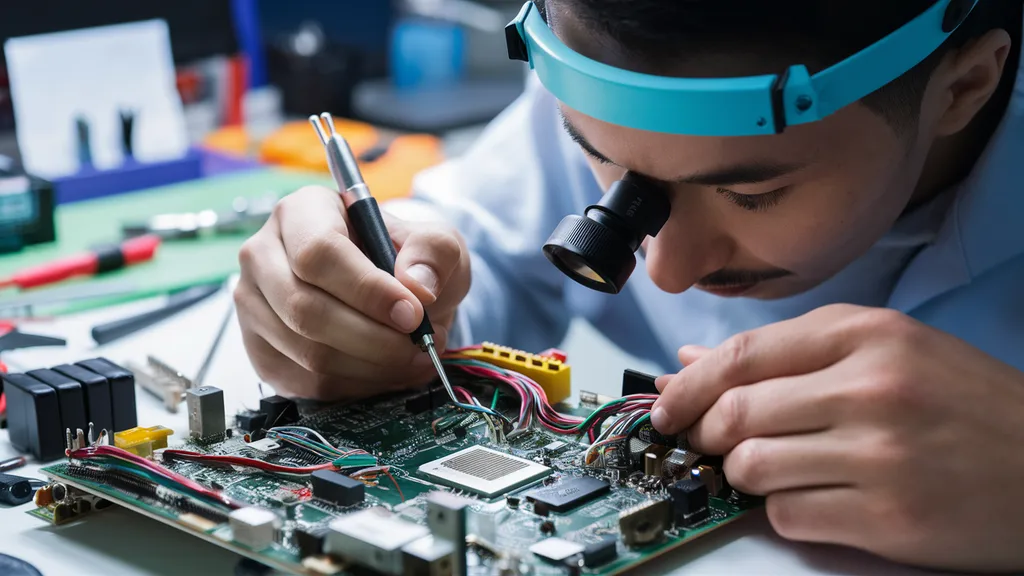
A motherboard is the central component of every computer system. It serves as the foundation that connects the processor, memory, storage devices, graphics card, and other hardware components into a functional unit. When a motherboard develops a fault, the entire system can become unstable or stop working completely. Understanding motherboard repair is essential for computer technicians, IT professionals, and even everyday users who want to save money and extend the lifespan of their devices.
Motherboard repair involves identifying faulty components, diagnosing hardware issues, replacing damaged parts, and restoring functionality. While some motherboard problems require advanced technical expertise, many issues can be detected and resolved through systematic troubleshooting. Whether you are dealing with a laptop motherboard, desktop motherboard, gaming PC motherboard, or workstation motherboard, learning the fundamentals of repair can help prevent costly replacements and reduce downtime.
This comprehensive guide explores motherboard repair techniques, common issues, diagnostic procedures, tools, maintenance practices, and professional repair solutions.
What Is Motherboard Repair?
Motherboard repair is the process of identifying and correcting faults within a computer’s main circuit board. The motherboard acts as the communication hub for all hardware components. When any circuit, capacitor, chipset, power regulator, or connection fails, system performance may suffer significantly.
Repairing a motherboard often involves inspecting physical damage, testing electronic components, replacing faulty parts, repairing damaged traces, and restoring proper electrical functionality. Unlike replacing the entire board, repair focuses on fixing specific problems, making it a cost-effective option in many situations.
Modern motherboards are highly complex and contain thousands of electronic pathways. As a result, motherboard repair requires patience, proper diagnostic equipment, and a thorough understanding of computer hardware.
Common Signs of a Faulty Motherboard
Recognizing motherboard failure symptoms early can prevent further damage and improve repair success rates. One of the most common indicators is a computer that refuses to power on despite having a functioning power supply. In some cases, users may notice random shutdowns, frequent restarts, blue screen errors, or hardware devices that suddenly stop working.
Another common symptom is the absence of display output even though the computer appears to be running. Overheating components, burnt smells, unusual beeping sounds, and failure to detect memory modules can also indicate motherboard-related issues.
USB ports, audio outputs, networking interfaces, and expansion slots may malfunction when motherboard circuits become damaged. Identifying these symptoms early can help technicians isolate the problem before it worsens.
Major Causes of Motherboard Failure
Several factors contribute to motherboard damage. Electrical surges are among the most common causes. Unexpected voltage spikes can damage delicate circuits, capacitors, and power regulation modules. Using surge protectors can significantly reduce this risk.
Heat is another major factor. Excessive temperatures can weaken solder joints, degrade electronic components, and cause thermal stress. Poor airflow, dust buildup, and failing cooling systems often accelerate motherboard deterioration.
Liquid spills represent another common source of motherboard failure. Water, coffee, soda, and other liquids can create short circuits that damage multiple areas of the board. Physical impact, manufacturing defects, aging components, and improper handling during upgrades can also contribute to motherboard damage.
Essential Tools for Motherboard Repair
Successful motherboard repair requires specialized tools. A digital multimeter is essential for measuring voltage, resistance, and continuity. This device helps technicians identify short circuits and faulty power rails.
A soldering station is another important tool used for replacing damaged capacitors, connectors, and integrated circuits. Hot air rework stations allow technicians to remove and reinstall surface-mounted components safely.
Additional tools include thermal cameras, magnifying microscopes, anti-static equipment, screwdrivers, diagnostic cards, cleaning solutions, and precision tweezers. These tools improve accuracy and reduce the risk of accidental damage during repairs.
Step-by-Step Motherboard Diagnostic Process
Effective motherboard repair begins with proper diagnosis. The first step is conducting a visual inspection. Technicians look for burnt components, damaged traces, swollen capacitors, corrosion, and loose connectors.
The second step involves testing the power supply to ensure it delivers stable voltage. Many motherboard problems are incorrectly diagnosed when the actual issue originates from the power source.
Next, technicians test RAM modules, processors, graphics cards, and storage devices individually. Removing unnecessary components simplifies troubleshooting and helps isolate the fault.
Voltage measurements are then taken across key power circuits. Any abnormal readings may indicate damaged power regulators or shorted components. Advanced technicians often use schematics and board diagrams to trace faults accurately.
Repairing Common Motherboard Problems
One of the most frequent motherboard repairs involves replacing damaged capacitors. Swollen or leaking capacitors can cause instability, power issues, and boot failures. Replacing these components often restores normal functionality.
Damaged USB ports are another common issue. Repeated plugging and unplugging can weaken solder joints or physically damage connectors. Skilled technicians can replace faulty ports without replacing the entire motherboard.
Corrosion damage from liquid exposure may require extensive cleaning and component replacement. Specialized cleaning agents remove residue and restore electrical connections.
Power regulation circuits frequently fail due to overheating or voltage spikes. Replacing MOSFETs, voltage regulators, and power management components can resolve many startup problems.
Broken motherboard traces may also be repaired by carefully bridging damaged pathways using fine conductive wire and precision soldering techniques.
Laptop Motherboard Repair vs Desktop Motherboard Repair
Laptop motherboard repair is generally more challenging than desktop motherboard repair. Laptop boards are smaller, denser, and contain highly integrated components. Accessing faulty areas often requires complete device disassembly.
Desktop motherboards typically provide more space and easier access for diagnostics and repairs. Component replacement is generally simpler, making desktop repairs more cost-effective in many cases.
However, both types of motherboards require careful handling, proper diagnostic procedures, and specialized equipment to ensure successful repairs.
Preventive Maintenance for Motherboards
Preventive maintenance plays a critical role in extending motherboard lifespan. Regular cleaning removes dust that can trap heat and interfere with cooling systems. Maintaining proper airflow inside the computer case helps prevent thermal damage.
Using high-quality power supplies and surge protection devices reduces the risk of electrical damage. Users should also avoid exposing computers to moisture, extreme temperatures, and physical shocks.
Routine monitoring of system temperatures allows early detection of cooling problems. Keeping software and firmware updated can improve hardware compatibility and overall system stability.
When to Repair or Replace a Motherboard
Deciding whether to repair or replace a motherboard depends on several factors. Minor issues such as damaged capacitors, faulty connectors, or isolated power circuit failures are often worth repairing.
However, extensive damage involving multiple layers of circuitry, severe liquid exposure, or obsolete hardware may make replacement more practical. Technicians typically compare repair costs against replacement costs before making a recommendation.
For high-end gaming systems, workstations, and specialized equipment, motherboard repair often provides significant savings compared to complete replacement.
Conclusion
Motherboard repair is a valuable skill that can extend the life of computers, reduce repair costs, and prevent unnecessary hardware waste. By understanding common motherboard problems, diagnostic techniques, repair methods, and preventive maintenance strategies, users can make informed decisions about hardware repairs. Whether dealing with desktop computers, laptops, gaming systems, or business workstations, proper motherboard repair can restore performance and reliability while maximizing the value of existing equipment. Investing in regular maintenance and early troubleshooting remains one of the most effective ways to keep motherboards functioning efficiently for years.
Frequently Asked Questions (FAQ)
What is the most common motherboard failure?
Power circuit failures, damaged capacitors, and overheating-related issues are among the most common motherboard problems.
Can a motherboard be repaired instead of replaced?
Yes. Many motherboard issues can be repaired by replacing damaged components, repairing circuits, or fixing connectors.
How much does motherboard repair cost?
Costs vary depending on the severity of damage, required components, and labor involved. Minor repairs are generally less expensive than full replacement.
Can water-damaged motherboards be repaired?
In many cases, yes. Successful repair depends on the extent of corrosion and how quickly the board is cleaned after exposure.
How long does motherboard repair take?
Simple repairs may take a few hours, while complex diagnostic and component-level repairs can require several days.
How can I prevent motherboard damage?
Use surge protection, maintain proper cooling, clean dust regularly, avoid liquid exposure, and monitor system temperatures to reduce the risk of motherboard failure.
